
Interview with Ghotly AI
by your side.

Ghotly AI is an AI interview assistant for Windows. It listens to the call, reads your screen and drafts answers in a small overlay. Try it free for 10 minutes, then it is ₹79 for a month.

How to use Ghotly AI 4.3.3: the video guide, from download to your first AI answer. Video guide
Works with your own keys
  • Gemini
  • Groq
  • OpenAI
  • Claude
  • OpenRouter

One small window on top of your call: it hears the question, reads the screen and drafts an answer with the AI you choose.

Free for 10 minutes · then ₹79 a month, no auto-renewal
  • 7AI providers, you pick one
  • 19global hotkeys, all remappable
  • 10 minfree for every account
  • ₹79for a month, no auto-renewal
A closer look

One small window, on top of the call.

The overlay sits over Zoom, Meet or Teams. It turns the interviewer's words into text, then answers with the AI and key you chose. Flip through the sample questions here, or watch the video guide at the top of the page.

Watch the full video guide
Ghotly AI
Excluded from captureCtrl B
Live transcript · Groq Whisper

Interviewer: How do you handle clock skew across nodes in a distributed rate limiter?

Sample answerDrafted with your own AI key
  • 1. Centralized Redis token bucket using Lua scripts for atomic decrement.
  • 2. Sliding window counter with TTL expiry bounds skew to sub-millisecond windows.
  • 3. In my previous payments project, this sustained 25,000 req/sec at <4ms latency.
A mock of the Ghotly AI desktop overlay above an interview call, showing sample questions and answers. In the app, the overlay drafts answers from the call transcript and screenshots, and asks Windows to leave it out of screen capture.

Every action is one keystroke away.

  • CtrlBShow / hide
  • CtrlShiftAStart / stop listening
  • Ctrl0Send to AI
  • CtrlEScreenshot
  • CtrlShiftXSelect a region
  • CtrlEnterAsk AI
  • CtrlShiftGGlance view
  • CtrlAltCCopy answer code
All shortcuts
What it does

Everything you need, in one small window.

Ghotly AI is a desktop overlay for Windows. It listens to system audio, turns speech into text with your own key, and asks the AI you choose for a short, structured answer.

Works with Zoom, Meet and Teams

Hidden from the call. Not from you.

Windows itself keeps the Ghotly AI overlay out of screen capture. Share your screen on Zoom, Google Meet, Microsoft Teams or any of the apps around the ghost, and the overlay stays on your side only.

  • Nothing to set up inside the meeting app: the overlay is a separate window on top of it
  • Windows 10 (version 2004 or later) and Windows 11
  • Run a quick test share on your own setup before the real call
How the hiding works
  • Zoom
  • Google Meet
  • Microsoft Teams
  • Webex
  • Skype
  • Slack
  • Discord
  • LinkedIn
  • WhatsApp
  • GoTo Meeting
  • Telegram
  • Rocket.Chat
  • Amazon Chime
  • Messenger
  • Mattermost
  • Zoho
  • Google Chat
  • BigBlueButton
  • Element
  • Signal
  • Google Chrome
  • Viber
  • LINE
  • KakaoTalk
  • Microsoft Edge
  • WeChat
  • Calendly
  • Firefox
  • Vonage
  • Zalo
  • Brave
  • TeamViewer
  • Opera
  • Threema
  • Loom
Live

Live transcription

System audio turns into text with your own Groq or Gemini key, so the question is on screen as it is asked.

Screenshot answers

Capture a coding or design question and get the approach, code, complexity and edge cases. Then keep asking follow-ups.

Answers that sound like you

Import your resume (PDF, DOCX, TXT or a photo) and answers draw on your real projects, skills and experience.

  • Your projects
  • Your skills
  • The role you want

Bring your own AI

Use your own keys. One provider is active at a time, with an optional fallback when one hits a rate limit.

  • Groq
  • Gemini
  • OpenRouter
  • NVIDIA
  • OpenAI
  • Anthropic
  • Grok
Daily feeds

Jobs for Engineers & Freshers

Openings collected daily across Maharashtra (MahaBharti, Majhi Naukri), central govt boards, and private tech roles. Track applications and match your resume.

  • Govt / SSC / Police
  • MahaBharti & Majhi Naukri
  • Software Engineer
Explore jobs

Your keys stay on your PC

Your AI keys are sealed by Windows (safeStorage / DPAPI) on your PC and never sent to us. The details you fill in for an interview are saved to your account, and our team can see them. Interviews reach your account only if you switch on history sync, and our team cannot read them.

What is saved, and where
How it works

From download to your first answer, in four steps.

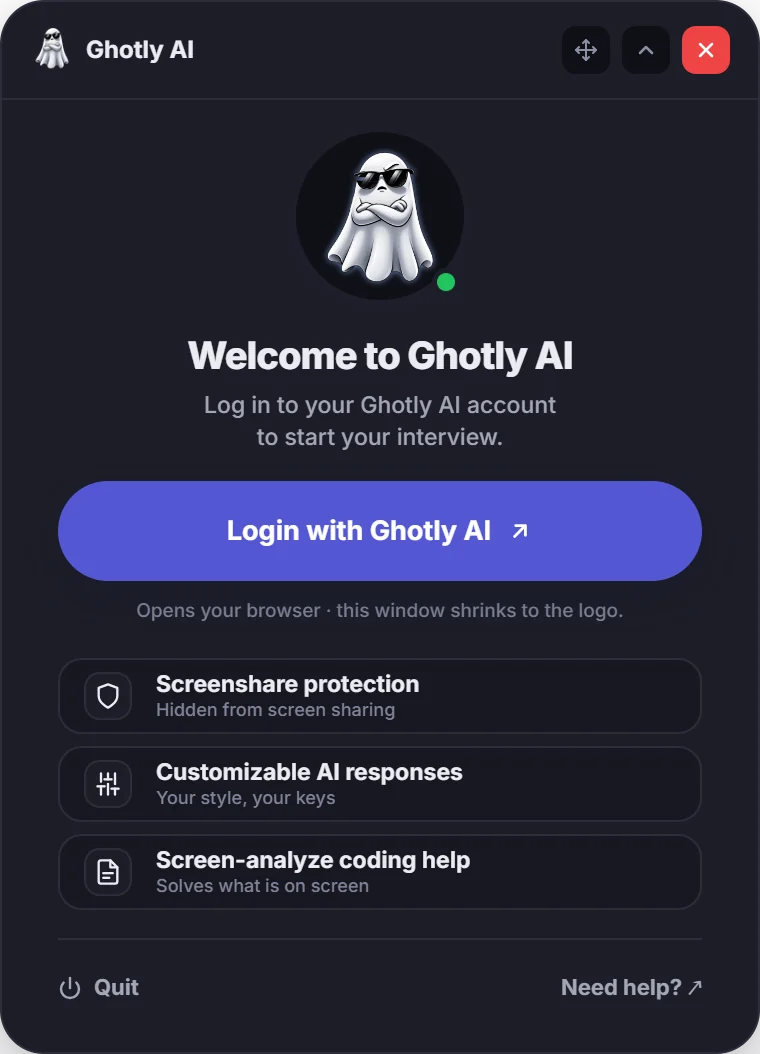
  1. Install

    Download the Windows installer from GitHub Releases and run it. The app opens as a small overlay and checks GitHub for new versions by itself.

    Ghotly AI sign-in screen with the Login with Ghotly AI button.
  2. Sign in with Google

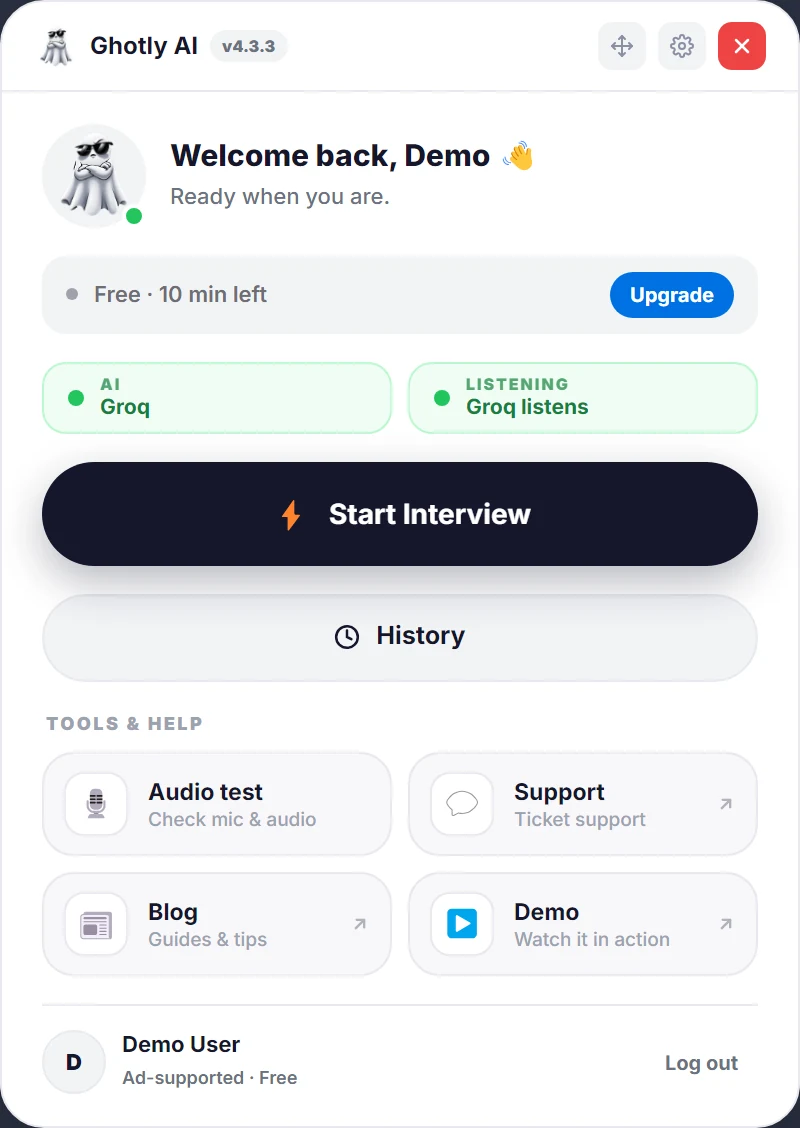
    Sign in once, in your browser; the sign-in is handed back to the app on your own machine. The home screen then shows whether your AI key is ready and which company listens.

    Ghotly AI 4.3.3 home screen: the plan strip, the AI and Listening cards (Groq listens), the Start Interview button, History, and tools for audio test, support, blog and demo.
  3. Add your keys

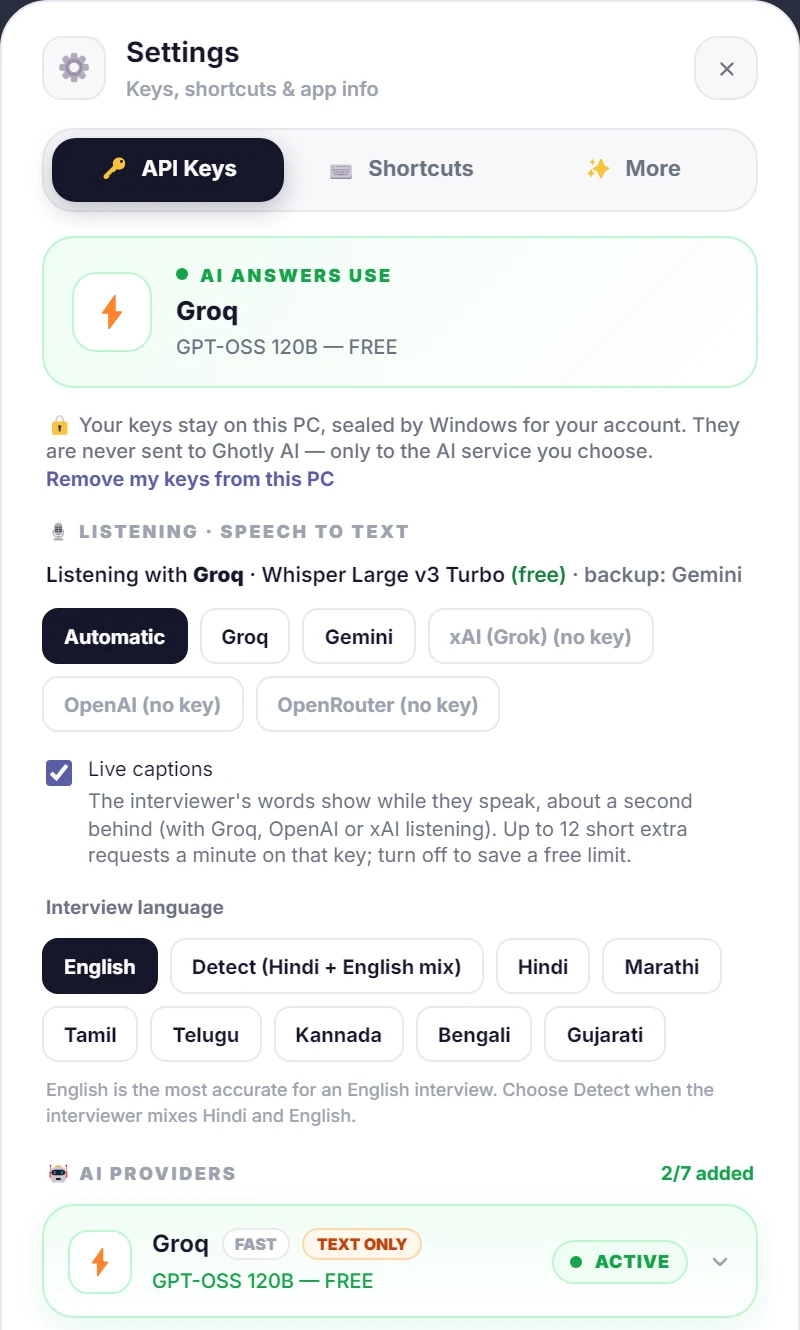
    Paste a key for one AI provider (Groq, Gemini, OpenAI, Claude). A free Groq or Gemini key both listens and answers. Keys are sealed in Windows safeStorage (DPAPI) on your PC and never uploaded to our servers.

    Ghotly AI settings, API Keys tab: the AI provider that answers, Listening with Groq (free) and Gemini as the backup, live captions, the interview language and the AI providers with their key status.
  4. Start a session

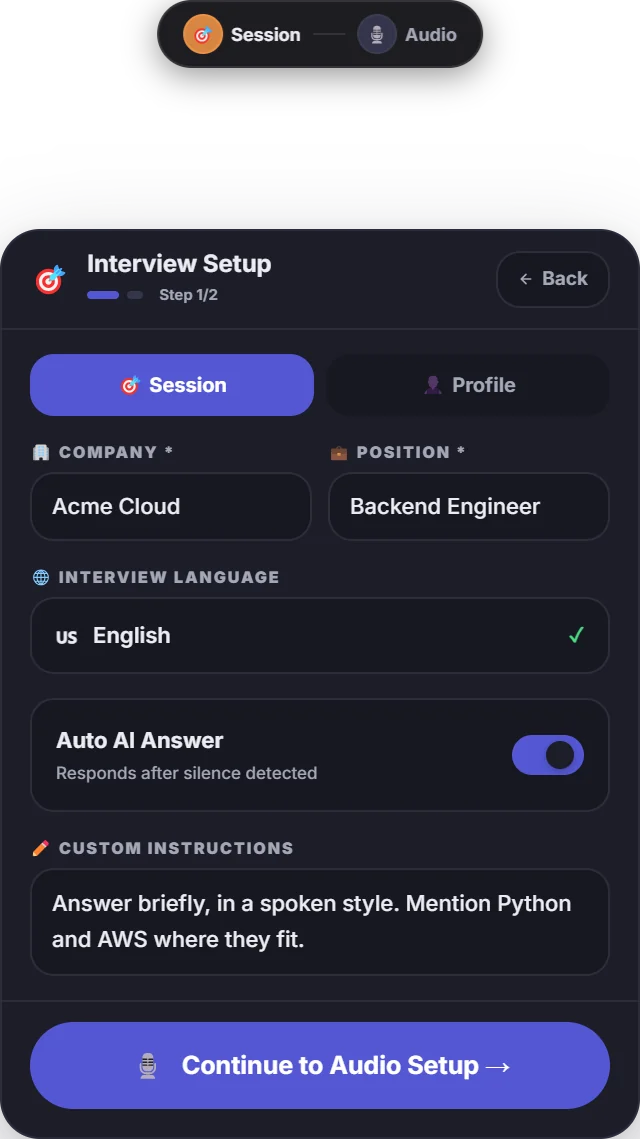
    Enter the company and position, add custom instructions if you like, press Start Interview and keep your hands on the hotkeys during the call.

    Ghotly AI interview setup: company, position, interview language, auto AI answer toggle and custom instructions.
Who it is for

Built for interview preparation.

From campus placements to senior rounds, practise answers that sound like you, built from your own background.

  • Freshers

    Campus placements

    Practise DSA, project and HR questions for your first job. Import your resume and answers draw on your real projects and skills.

  • Developers

    Coding and system design

    Capture a problem with Ctrl + E for the approach, code, complexity and edge cases, then ask follow-ups about trade-offs and scale.

  • Any role

    HR and behavioral rounds

    Live transcription and AI chat work for any conversation, from HR and managerial rounds to sales, support and other non-technical roles.

  • Practice

    Mock interviews

    Run a mock interview with a friend or a recorded set of questions. Every question and answer is saved to your history to review later.

Pricing

Try it free. Then ₹79 a month.

One plan with the whole app. Pay for a month when you need it; nothing renews by itself.

Ghotly AI Pro
₹79for one month

One payment for a calendar month. Nothing renews by itself: buy another month when you need it and it starts when the current one ends.

  • Unlimited interviews
  • No ads
  • Up to 3 PCs
  • Open every job and apply
  • Priority ticket support
  • Fast response ai answer
  • All features active
Free

Try it first. 10 minutes of interviews for every account, with a short sponsor ad before a session. Every feature, no card needed; once per account, counted while an interview runs.

Download

Your own AI keys. Ghotly AI uses your own key for one AI provider (Groq, Gemini, OpenRouter, NVIDIA, OpenAI, Anthropic or Grok). A free Groq or Gemini key both hears the call and answers. Past a free tier, the provider bills you directly.

Help with keys

Amounts are in Indian rupees. See the pricing page for what is included and the terms for details.

Ghotly AI FAQ

Straight answers.

Cannot find yours? Ask us

Ghotly AI (also written "Ghostly AI") is an AI interview assistant for Windows. It is a small overlay that sits on top of your Zoom, Google Meet or Microsoft Teams call: it transcribes the interviewer with your own AI key, reads coding and multiple-choice questions from your screen, and drafts answers with the AI provider and key you choose.

Partly. The download is free and every account gets 10 minutes of interviews free, once; a free session starts with a short sponsor ad. After that there is one plan: ₹79 for a calendar month. It is one payment with no auto-renewal and no ads, it puts your support tickets in the priority queue, and it lets you open every job on the jobs page and apply. Every signed-in account can open support tickets. You also pay your AI and speech providers directly if your usage goes past their free tiers.

Yes, you bring your own. You need a key for at least one AI provider: Groq, Gemini, OpenRouter, NVIDIA, OpenAI, Anthropic or Grok. A free Groq or Gemini key is enough: since version 4.3.3 the same key hears the interviewer and writes the answers (Claude and NVIDIA keys answer but cannot hear, so add a Groq or Gemini key with them). Some providers offer free tiers; check their current limits and terms. A chat subscription (ChatGPT Plus, or a Gemini or Claude plan) cannot be used instead: those plans work only in their own apps, and other apps can use only API keys.

On Windows 10 (version 2004 or later) and Windows 11 the overlay uses the WDA_EXCLUDEFROMCAPTURE display flag, which asks Windows to leave that window out of screen capture and recording. It is an operating-system feature, so results depend on how the app you share with captures your screen. Test it with your own setup before you rely on it.

Your resume details, app settings and interviews are saved on your PC, separately for each account. Your app settings (never your API keys) are also kept, encrypted, in your Ghotly AI account so a new PC starts ready; your Interview Setup details (resume details, company, position, custom instructions) are saved there too, and our team can see them and may contact you about your account or the app, as you accept at sign-in. Your interviews (questions and answers, never screenshots) go there only if you switch on "Sync interview history", and our team cannot read them. You can switch the sync off in the app or delete it all under Account > Privacy & data. Your API keys stay only on your PC, sealed by Windows - they are never sent to us. Signing in with Google, your account record and a usage heartbeat go through our servers too. Audio goes to the company that listens (your Groq, Gemini, xAI, OpenAI or OpenRouter key), and prompts and screenshots go to the AI provider you picked. A resume you import in the app is read on your PC and its text goes to your AI provider (or, if that one is out of quota, another provider you added a key for) to fill in your details; for a scan or photo the app asks before it sends the page images. The resume file itself never reaches us. The privacy policy lists every case.

Not today. Ghotly AI runs on 64-bit Windows 10 and 11. macOS: coming soon. Linux: not planned.

Mostly the price and who pays for the AI. Those tools include the AI in their price: on 13 November 2026 their pricing pages listed ₹9,470 a month for Parakeet AI in India, from ₹4,437.67 a month (billed every 3 months) for LockedIn AI in India, $19.99 a month for Cluely Pro and from $25 a month for Final Round AI Pro. Ghotly AI uses your own AI key, so after 10 free minutes it costs ₹79 for a calendar month, with no auto-renewal. They run on more devices, including Mac; Ghotly AI is Windows-only for now. The blog compares each of them in detail.

Yes. Live transcription and AI chat work for any conversation. Screenshot analysis is most useful for coding and system-design questions.

That depends on the rules of the company and the platform you are interviewing on. Many employers prohibit outside assistance. You are responsible for following those rules. Ghotly AI is intended for preparation and practice; see the terms.

Mahesh Shelke, a Cloud and DevOps engineer from Pune, India, together with the CloudBuild team. It is an independent project, not related to Chiku AI or Parakeet AI, or to tools with similar names such as Ghost, GhostInterview or GhostDesk. Its website is ghotlyai.in.

The installer is published on GitHub Releases (current version 4.3.3) and downloaded through download.ghotlyai.in, a fast mirror; the app updates itself from there. The app is released under the MIT licence.

Sign in at ghotlyai.in, open Plan & payments and press Pay ₹79. The payment opens on Cashfree's secure page: UPI, a debit or credit card, net banking or a wallet. It is one payment for a calendar month with no auto-renewal, and the plan switches on by itself, on the website and in the app, once the payment is confirmed.

Get Ghotly AI for Windows, free.

Version 4.3.3 for Windows 10 and 11. Install it, sign in with Google, add your keys and run a practice session in a few minutes.

अपने अगले इंटरव्यू की तैयारी, आज से।